
For iPad
Your chord sheets, ready for the stage.
StageScroll keeps lyrics and chords big, clear and lined up, then scrolls them for you: by pedal, by auto-scroll or in step with your band. Keep your eyes up and your hands on the guitar.
Free to download. No account, no ads, and it works offline.
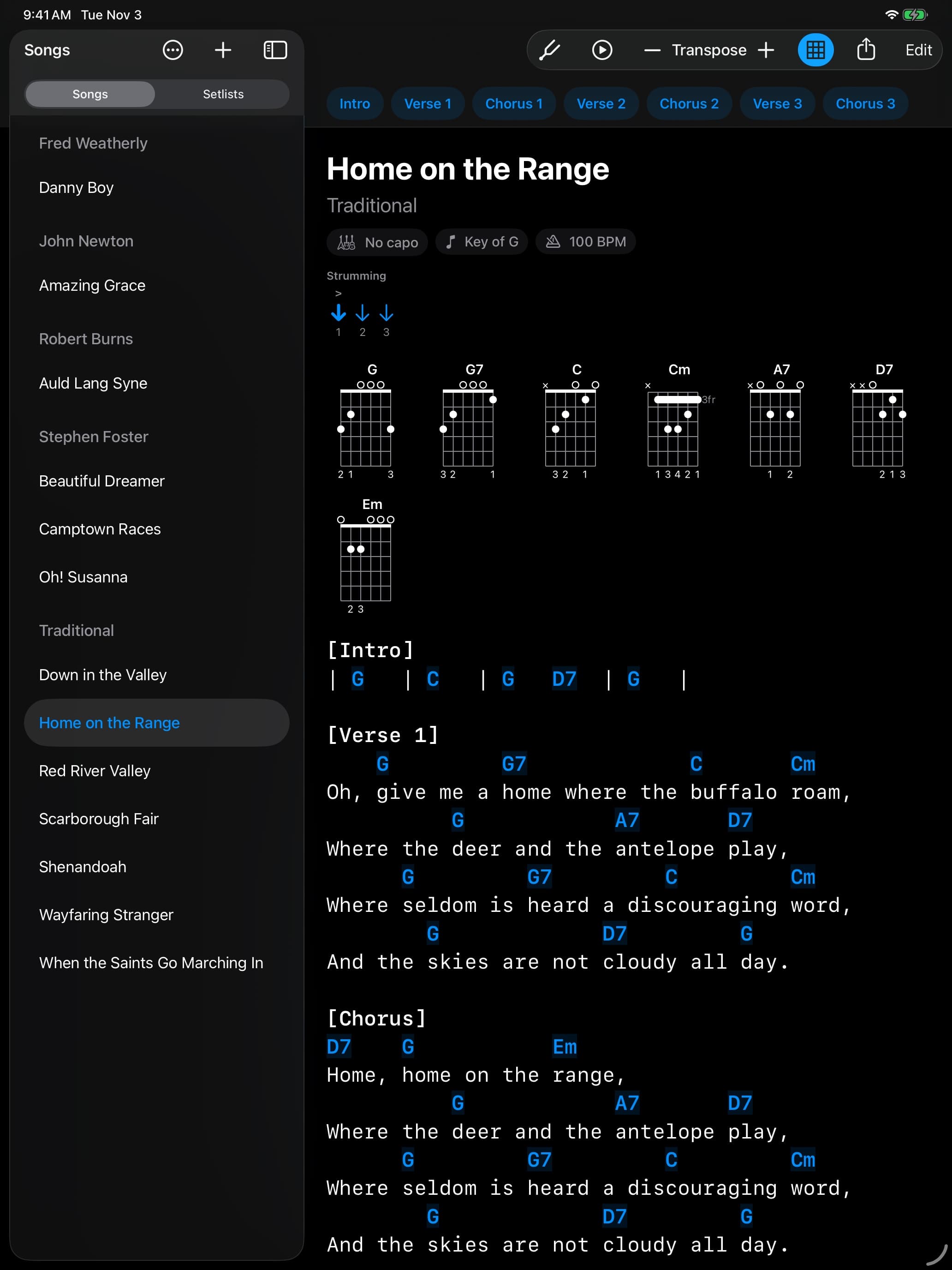
Everything you reach for mid-song, one tap or one stomp away.
Turn pages with your foot
A Bluetooth page-turner pedal scrolls a screen, or a few lines, at a time, so your hands stay on the strings. Pick any keys, or use a MIDI pedal over USB, Bluetooth or the network.
Auto-scroll at your pace
Tap play and the song scrolls by itself. Set the speed once and it's saved with the song. A press of the pedal pauses it.
Setlists for the whole show
Put songs in order and step through the set. With the pedal option on, a press past the end of a song opens the next one.
Every chord has a diagram
Show a diagram for every chord in the song, with fingerings. Transpose, or move the capo, and the diagrams follow.
Jump to any section
Verses, choruses and bridges get a bar above the sheet. Tap one to go straight there; the part you're playing is highlighted.
Tuner and metronome built in
The tuner knows the song's tuning, standard or E♭, with or without the capo. Tap a song's tempo for a click that flashes on the beat.
Bring your songs in, take them out
Paste a chord sheet from anywhere, open a PDF or import ChordPro. Share a song or a whole songbook as a PDF, ChordPro or song files.
Play in sync with your bandUnlock
One iPad leads and the rest follow its songs, scrolling, transposition and metronome, over Wi-Fi or Bluetooth with no internet needed. Bandmates join with a four-digit code.
Sound padsUnlock
Give a song up to four sounds, such as an intro, a drone or a loop, and fire them from the pedal, with an optional count-in.
Light or dark, solo or with the band.
These are the app as it is, on iPad Pro and iPad mini, with songs old enough to be free for anyone to sing.


Free to play. One purchase for the band.
Pedal scrolling, auto-scroll, setlists, chord diagrams, the tuner and the metronome, importing and sharing are all free, for good. A one-time unlock adds the rest. No subscription.
- Band syncLead your bandmates' iPads, or follow the leader's.
- Sound padsUp to four sounds per song, played from the pedal.
- Import many songs at onceWhole folders, zips and StageScroll backups, sounds included.
Your songs stay yours.
StageScroll collects nothing: no account, no ads, no analytics, no tracking. Your library is a folder of plain-text files on your iPad, so it's never locked inside the app.
Read the privacy policy →Traditional - Home on the Range.txt Title: Home on the Range Artist: Traditional Key: G Tempo: 100 --- [Verse 1] G G7 C Cm Oh, give me a home where the buffalo roam,
Support
A question, a bug, or a pedal that won't pair? Email NeuralPulse Labs and you'll get a reply from the people who make StageScroll.
stagescroll@neuralpulselabs.com- What do I need?
- An iPad with iPadOS 16 or later. Any Bluetooth page-turner pedal that types keyboard keys works, and so do MIDI pedals and controllers.
- Is it free?
- StageScroll is free to download, and everything except the items in the unlock is free to use, with no ads and no time limit. A one-time in-app purchase of $4.99 adds band sync, sound pads and importing many songs at once.
- Does it work on iPhone or Mac?
- No. StageScroll is made for the iPad's screen, so a whole verse and its chords fit at a size you can read from a music stand.
- How do I bring in songs from somewhere else?
- Copy a chord sheet from a web page, a document or a note and paste it into the app: it works out the title, capo and sections. PDFs with text in them and ChordPro files import too.
- Where are my songs kept?
- On your iPad, as plain-text files you can see in the Files app under On My iPad › StageScroll. Copy files in or out through Files or Finder at any time.
- Do I need an account or an internet connection?
- No. There's no sign-up, and StageScroll works offline, so it keeps going at venues with bad Wi-Fi. Band sync connects the iPads directly.